TEST ARTICLE CONTENT
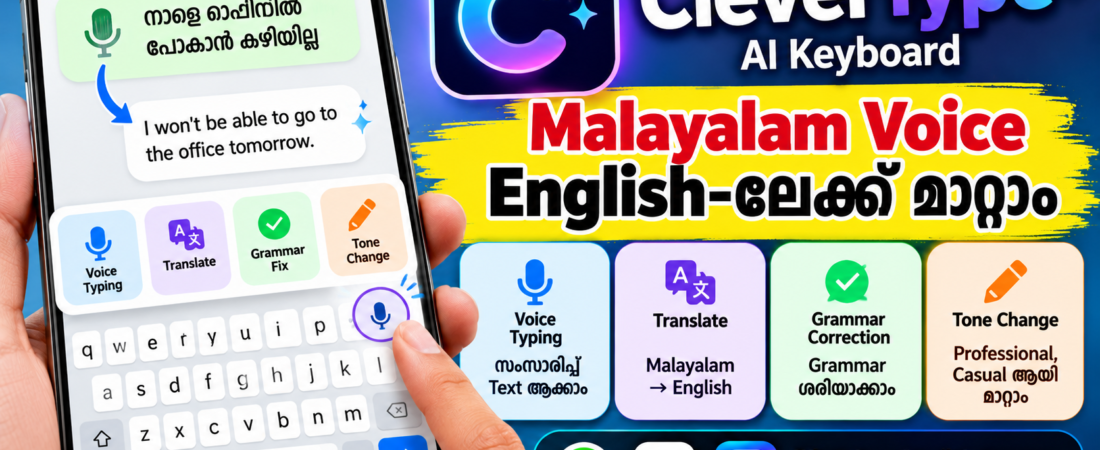
CleverType AI Keyboard ഉപയോഗിച്ച് Malayalam voice typing, English translation, grammar correction, tone മാറ്റൽ തുടങ്ങിയ AI features എങ്ങനെ ഉപയോഗിക്കാം എന്ന് അറിയാം.
CleverType AI Keyboard എന്താണ്?
Phone-ൽ message type ചെയ്യുമ്പോൾ spelling mistake, grammar mistake, translation തുടങ്ങിയ കാര്യങ്ങൾക്കായി പലപ്പോഴും വേറെ apps തുറക്കേണ്ടി വരാറുണ്ട്.
ഇവയെല്ലാം keyboard-ൽ തന്നെ ചെയ്യാൻ സഹായിക്കുന്ന ഒരു AI Keyboard ആണ് CleverType. Official website പ്രകാരം grammar correction, AI voice typing, translation, tone change, AI writing assistants തുടങ്ങിയ features ഇതിൽ ലഭ്യമാണ്. (CleverType)
അതായത് WhatsApp, Gmail, Instagram, SMS തുടങ്ങിയ apps-ൽ typing ചെയ്യുമ്പോൾ തന്നെ AI features ഉപയോഗിക്കാം.
1. CleverType AI Keyboard Install ചെയ്യുക
Android phone ആണെങ്കിൽ Google Play Store തുറക്കുക.
Search ചെയ്യുക:
CleverType AI Keyboard
Official Google Play listing-ൽ CleverType AI Keyboard ലഭ്യമാണ്. (Google Play)
CleverType AI Keyboard – Google Play
Install ചെയ്ത ശേഷം app തുറന്ന് initial setup complete ചെയ്യുക.
Keyboard enable ചെയ്യാനും default keyboard ആയി തിരഞ്ഞെടുക്കാനും phone settings-ലേക്ക് പോകേണ്ടി വരാം. CleverType-ന്റെ setup guide-ലും keyboard enable ചെയ്ത് default keyboard ആയി select ചെയ്യേണ്ടതുണ്ടെന്ന് പറയുന്നു. (CleverType)
2. Malayalam Voice പറഞ്ഞാൽ Text ആക്കാം
CleverType-ന്റെ AI Voice Typing feature ഉപയോഗിച്ച് സംസാരിച്ച് text എഴുതാം.
Keyboard തുറന്ന ശേഷം microphone/voice typing option തിരഞ്ഞെടുക്കുക.
ഇനി Malayalam-ൽ സംസാരിക്കുക.
ഉദാഹരണത്തിന്:
“നാളെ വൈകിട്ട് എന്നെ വിളിക്കണം”
എന്ന് പറഞ്ഞാൽ അത് text ആയി എഴുതാൻ കഴിയും.
CleverType പറയുന്നതനുസരിച്ച് AI Voice Typing സംസാരിച്ച text-ൽ punctuation, capitalization, formatting എന്നിവ automatically ചേർക്കാനും filler words ഒഴിവാക്കാനും സഹായിക്കുന്നു. (CleverType)
ഇത് WhatsApp messages, emails, notes തുടങ്ങിയവ type ചെയ്യുമ്പോൾ ഉപകാരപ്പെടും.
3. Malayalam Text English-ലേക്ക് Translate ചെയ്യാം
ഇതാണ് CleverType-ന്റെ interesting features-ൽ ഒന്ന്.
നിങ്ങൾ Malayalam-ൽ എഴുതിയ text English-ലേക്ക് മാറ്റാൻ AI Translation ഉപയോഗിക്കാം.
ഉദാഹരണം:
Malayalam:
“എനിക്ക് ഇന്ന് ഓഫീസിൽ പോകാൻ കഴിയില്ല.”
English:
“I won’t be able to go to the office today.”
CleverType-ന്റെ official website പ്രകാരം AI Translation context മനസ്സിലാക്കി translation നൽകാനും original tone നിലനിർത്താനും സഹായിക്കുന്നു. (CleverType)
Google Play listing-ലും 40+ languages-ൽ AI translation support ഉണ്ടെന്ന് പറയുന്നു. (Google Play)
4. English Grammar Automatically ശരിയാക്കാം
English message type ചെയ്യുമ്പോൾ grammar mistake ഉണ്ടാകുന്നത് സാധാരണമാണ്.
ഉദാഹരണത്തിന്:
Wrong:I am go to office tomorrow.
CleverType-ന്റെ Grammar Fix ഉപയോഗിച്ച് ഇത് കൂടുതൽ ശരിയായ sentence ആക്കാൻ സഹായിക്കും.
Official website പ്രകാരം grammar, spelling എന്നിവ keyboard-ൽ നിന്ന് തന്നെ one-tap correction ഉപയോഗിച്ച് ശരിയാക്കാം. (CleverType)
അതുകൊണ്ട് English emails, WhatsApp messages, social media captions തുടങ്ങിയവ എഴുതുമ്പോൾ ഇത് ഉപയോഗപ്രദമാണ്.
5. Message-ന്റെ Tone മാറ്റാം
ഒരു message professional ആക്കണമെങ്കിൽ?
അല്ലെങ്കിൽ friendly ആയി എഴുതണമെങ്കിൽ?
CleverType-ന്റെ AI writing features ഉപയോഗിച്ച് sentence rewrite ചെയ്യാനും tone മാറ്റാനും കഴിയും.
ഉദാഹരണത്തിന് ഒരു simple sentence:
“Send me the file.”
ഇത് professional ആയി മാറ്റാൻ AI ഉപയോഗിക്കാം.
“Could you please send me the file when you get a chance?”
അതുപോലെ casual, formal തുടങ്ങിയ രീതികളിലും text മാറ്റാൻ കഴിയും. Google Play listing-ൽ professional, casual, funny, formal തുടങ്ങിയ tone options സംബന്ധിച്ച് വിവരങ്ങൾ നൽകുന്നുണ്ട്. (Google Play)
🤖 Keyboard-ൽ ChatGPTയും AI Assistants-ഉം
CleverType-ൽ AI writing assistants ഉൾപ്പെടുന്നുണ്ട്.
Official website പ്രകാരം keyboard-ൽ നിന്ന് തന്നെ ChatGPT ഉൾപ്പെടെയുള്ള 20+ AI assistants ഉപയോഗിക്കാം. (CleverType)
Google Play listing-ൽ 30+ AI assistants, custom tools തുടങ്ങിയവയും പറയുന്നു. (Google Play)
ഇവ ഉപയോഗിച്ച്:
- Message എഴുതാം
- Text rewrite ചെയ്യാം
- Caption തയ്യാറാക്കാം
- Text summarize ചെയ്യാം
- Grammar check ചെയ്യാം
- Translation ചെയ്യാം
എന്നിങ്ങനെ പല കാര്യങ്ങളും ചെയ്യാം.
📱 WhatsApp-ൽ CleverType എങ്ങനെ ഉപയോഗിക്കാം?
WhatsApp തുറക്കുക.
ഒരു chat തുറന്ന് keyboard വരുത്തുക.
ഇനി CleverType keyboard-ൽ:
Voice Typing → Malayalam സംസാരിക്കുക → Text ലഭിക്കും
അല്ലെങ്കിൽ:
Type Malayalam → Translate → English
എന്ന രീതിയിൽ ഉപയോഗിക്കാം.
English message അയയ്ക്കുന്നതിന് മുമ്പ്:
Grammar Fix
ഉപയോഗിച്ച് sentence പരിശോധിക്കാനും കഴിയും.
CleverType പല keyboard-input apps-ലും പ്രവർത്തിക്കാൻ രൂപകൽപ്പന ചെയ്തതാണെന്ന് official information പറയുന്നു. (CleverType)
🔐 Privacy ശ്രദ്ധിക്കേണ്ട കാര്യം
AI keyboard ഉപയോഗിക്കുമ്പോൾ privacy ശ്രദ്ധിക്കുന്നത് വളരെ പ്രധാനമാണ്.
Keyboard apps typing-ുമായി ബന്ധപ്പെട്ട permissions ആവശ്യപ്പെടാൻ സാധ്യതയുള്ളതിനാൽ installation സമയത്ത് കാണിക്കുന്ന permissions ശ്രദ്ധിച്ച് വായിക്കുക.
Google Play listing-ലെ developer-provided data safety information പ്രകാരം CleverType ചില personal information, app activity എന്നിവ collect ചെയ്യാമെന്ന് കാണിക്കുന്നു; data practices region, age, usage എന്നിവ അനുസരിച്ച് മാറാം. (Google Play)
അതുകൊണ്ട് banking passwords, OTP, card details തുടങ്ങിയ sensitive information AI keyboard-ൽ type ചെയ്യുമ്പോൾ പ്രത്യേക ശ്രദ്ധ പുലർത്തുക.
💡 CleverType ഉപയോഗിച്ച് ചെയ്യാൻ കഴിയുന്ന 5 കാര്യങ്ങൾ
1. Malayalam Voice Typing
സംസാരിച്ച് text തയ്യാറാക്കാം.
2. Malayalam → English Translation
Malayalam text English-ലേക്ക് മാറ്റാം.
3. Grammar Correction
English grammar, spelling mistakes ശരിയാക്കാം.
4. Tone Change
Professional, casual തുടങ്ങിയ രീതിയിൽ message rewrite ചെയ്യാം.
5. AI Assistance
Keyboard-ൽ നിന്ന് തന്നെ AI writing tools ഉപയോഗിക്കാം. (CleverType)
🔗 Official Links
CleverType Official Website:
CleverType Official Website
Android Download:
CleverType AI Keyboard – Google Play
✅ Quick Guide
Step 1: CleverType install ചെയ്യുക.
Step 2: Settings-ൽ keyboard enable ചെയ്യുക.
Step 3: CleverType default keyboard ആയി തിരഞ്ഞെടുക്കുക.
Step 4: WhatsApp/Gmail പോലുള്ള app തുറന്ന് keyboard ഉപയോഗിക്കുക.
Step 5: Voice Typing, Translate, Grammar Fix, Tone Change തുടങ്ങിയ AI features പരീക്ഷിക്കുക.
Conclusion
CleverType AI Keyboard സാധാരണ typing-നെ കൂടുതൽ smart ആക്കാൻ സഹായിക്കുന്ന AI keyboard ആണ്.
Malayalam-ൽ സംസാരിച്ച് text തയ്യാറാക്കാനും, text മറ്റൊരു ഭാഷയിലേക്ക് translate ചെയ്യാനും, English grammar ശരിയാക്കാനും, message-ന്റെ tone മാറ്റാനും keyboard-ൽ നിന്ന് തന്നെ AI features ഉപയോഗിക്കാം. (CleverType)
പ്രത്യേകിച്ച് Malayalam → English communication കൂടുതൽ എളുപ്പമാക്കാൻ ഇത് പരീക്ഷിക്കാവുന്ന ഒരു useful tool ആണ്.
ഒരു keyboard-ൽ typing + translation + grammar + AI assistance — എല്ലാം ഒരുമിച്ച് പരീക്ഷിക്കാം.