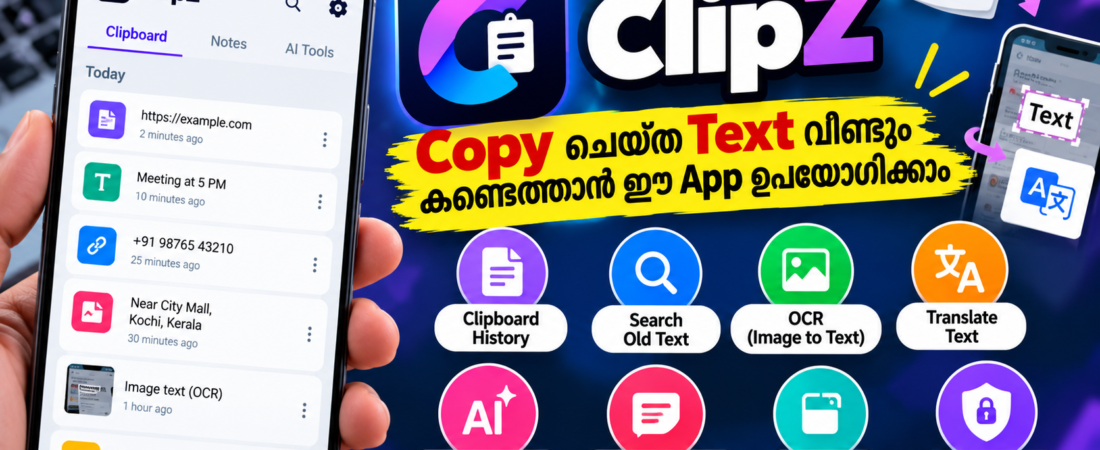
ClipZ ഉപയോഗിച്ച് copy ചെയ്ത text വീണ്ടും കണ്ടെത്താനും OCR വഴി text എടുക്കാനും translate ചെയ്യാനും AI tools ഉപയോഗിക്കാനും എങ്ങനെ എന്ന് അറിയാം.
WhatsApp Tools: ദിവസവും ഉപയോഗിക്കാൻ പറ്റുന്ന 7 Useful Tools
നമ്മൾ phone-ൽ പലപ്പോഴും ഒരു text, phone number, link, address, message എന്നിവ copy ചെയ്യും. പക്ഷേ കുറച്ച് കഴിഞ്ഞ് അത് വീണ്ടും വേണമെങ്കിൽ എവിടെ പോയെന്ന് കണ്ടെത്താൻ ബുദ്ധിമുട്ടാണ്. Android-നുള്ള ClipZ എന്ന clipboard manager ഈ പ്രശ്നം പരിഹരിക്കാൻ സഹായിക്കുന്ന app ആണ്. Google Play listing പ്രകാരം, ഇത് clipboard history save ചെയ്യുന്നതിനൊപ്പം OCR, translation, AI text tools, floating bubble തുടങ്ങിയ features നൽകുന്നു. (Google Play)
ClipZ എന്താണ്?
ClipZ ഒരു സാധാരണ copy-paste app മാത്രമല്ല. നമ്മൾ copy ചെയ്യുന്ന text പിന്നീട് search ചെയ്ത് കണ്ടെത്താനും favourite/pin ചെയ്യാനും reusable text snippets ആയി സൂക്ഷിക്കാനും ഇതിൽ options ഉണ്ട്. Screen-ലോ image-ലോ ഉള്ള text OCR ഉപയോഗിച്ച് extract ചെയ്യാനും, ആവശ്യത്തിന് translate ചെയ്യാനും കഴിയും. (Google Play)
Google Play listing പ്രകാരം ClipZ-ന് 10K+ downloads ഉണ്ട്, app-ൽ ads, in-app purchases എന്നിവയും ഉണ്ട്. Listing-ൽ കാണുന്ന data-safety information പ്രകാരം third parties-ുമായി data share ചെയ്യുന്നില്ലെന്ന് developer പ്രഖ്യാപിച്ചിട്ടുണ്ട്; device or other IDs collect ചെയ്യാൻ സാധ്യതയുണ്ടെന്നും data in transit encrypted ആണെന്നും പറയുന്നു. (Google Play)
1. Copy ചെയ്ത Text History ആയി സൂക്ഷിക്കാം
ClipZ-ന്റെ പ്രധാന feature Clipboard History ആണ്.
ഉദാഹരണത്തിന്, WhatsApp-ൽ നിന്ന് ഒരു address copy ചെയ്തു. പിന്നീട് മറ്റൊരു message copy ചെയ്താലും പഴയ address ClipZ-ന്റെ clipboard history-ൽ നിന്ന് വീണ്ടും കണ്ടെത്താൻ സാധിക്കും.
ഉപയോഗിക്കുന്ന വിധം
- ClipZ install ചെയ്യുക.
- ആവശ്യമായ permissions/settings enable ചെയ്യുക.
- Phone-ൽ ഏതെങ്കിലും text copy ചെയ്യുക.
- ClipZ തുറക്കുക.
- Clipboard history-ൽ copied text കണ്ടെത്തുക.
- ആവശ്യമായ text വീണ്ടും copy ചെയ്യുക.
Frequent ആയി ഒരേ information പല സ്ഥലത്തും paste ചെയ്യുന്നവർക്ക് ഇത് പ്രത്യേകിച്ച് useful ആണ്. (Google Play)
2. പഴയ Text Search ചെയ്യാം
Clipboard history വലുതായാൽ ഓരോ item-വും manually നോക്കേണ്ട ആവശ്യമില്ല.
ClipZ-ൽ search ഉപയോഗിച്ച് മുമ്പ് copy ചെയ്ത word, sentence, link അല്ലെങ്കിൽ note കണ്ടെത്താൻ കഴിയും. Frequently used items favourite ചെയ്യാനും pin ചെയ്യാനും options ഉണ്ട്. (Google Play)
ഉദാഹരണത്തിന് നിങ്ങൾ സ്ഥിരമായി ഉപയോഗിക്കുന്ന:
- Email address
- Website URL
- Home address
- WhatsApp reply
- Business message
- Frequently used sentence
എന്നിവ save ചെയ്ത് വീണ്ടും വീണ്ടും ഉപയോഗിക്കാം.
3. Screenshot-ൽ നിന്ന് Text എടുക്കാം
Copy ചെയ്യാൻ കഴിയാത്ത text ഉള്ള screenshot അല്ലെങ്കിൽ image ഉണ്ടെങ്കിൽ OCR feature ഉപയോഗിക്കാം.
OCR എന്നത് Optical Character Recognition എന്നാണ്. ഇത് image-ൽ കാണുന്ന letters തിരിച്ചറിഞ്ഞ് editable text ആക്കി മാറ്റാൻ സഹായിക്കുന്നു.
ClipZ-ന്റെ current listing പ്രകാരം screen-ലും images-ലും കാണുന്ന text OCR ഉപയോഗിച്ച് extract ചെയ്യാം. പുതിയ update-ൽ offline OCR, manual region capture എന്നിവയും ചേർത്തതായി developer പറയുന്നു. (Google Play)
ഉദാഹരണത്തിന് ഒരു screenshot-ൽ:
“ഇത് copy ചെയ്യാൻ കഴിയുന്നില്ല”
എന്ന രീതിയിൽ text selection unavailable ആണെങ്കിൽ OCR ഉപയോഗിച്ച് അത് text ആയി എടുക്കാൻ ശ്രമിക്കാം.
4. Screen-ലെ Text Translate ചെയ്യാം
മറ്റൊരു useful feature screen translation ആണ്.
ഒരു app അല്ലെങ്കിൽ website-ൽ English അല്ലെങ്കിൽ മറ്റൊരു ഭാഷയിലെ text കാണുമ്പോൾ അത് വായിക്കാൻ ബുദ്ധിമുട്ടാണെങ്കിൽ ClipZ-ന്റെ screen tools ഉപയോഗിച്ച് text extract ചെയ്ത് translate ചെയ്യാൻ കഴിയും. Developer documentation പ്രകാരം screen OCR വഴി ലഭിച്ച text-ന് translation പോലുള്ള actions തുടർന്നും ഉപയോഗിക്കാം. (ClipZ)
Foreign websites അല്ലെങ്കിൽ unfamiliar apps ഉപയോഗിക്കുന്നവർക്ക് ഇത് helpful ആയേക്കാം.
5. AI ഉപയോഗിച്ച് Text മാറ്റാം
ClipZ-ൽ ചില AI text tools-ഉം ലഭ്യമാണ്.
Google Play listing പ്രകാരം:
- AI Paraphrasing
- Text Summarization
- Translation
- Grammar & Spell Checking
- Text Correction
- Content Generation
- AI Writing Assistant
തുടങ്ങിയ features ഉൾപ്പെടുത്തിയിട്ടുണ്ട്. (Google Play)
ഉദാഹരണത്തിന് ഒരു message copy ചെയ്ത ശേഷം അത് professional tone-ലേക്ക് മാറ്റാനോ, വലിയ text short summary ആക്കാനോ ഈ tools ഉപയോഗിക്കാം.
6. Floating Bubble ഉപയോഗിക്കാം
ClipZ-ന്റെ മറ്റൊരു interesting feature Floating Bubble ആണ്.
ഇത് screen-ൽ quick-access bubble ആയി ഉപയോഗിക്കാം. അതിലൂടെ clipboard history, saved notes, apps, shortcuts, screen text extraction തുടങ്ങിയ functions വേഗത്തിൽ access ചെയ്യാൻ കഴിയുമെന്ന് Play Store listing പറയുന്നു. (Google Play)
അതായത് WhatsApp-ൽ നിന്ന് പുറത്തേക്ക് പോയി വീണ്ടും ClipZ തുറക്കേണ്ട സാഹചര്യം കുറയ്ക്കാൻ ഇത് സഹായിക്കും.
7. Frequently Used Messages Save ചെയ്യാം
നിങ്ങൾ ഒരേ message പലർക്കും അയക്കുന്നുണ്ടെങ്കിൽ അത് വീണ്ടും വീണ്ടും type ചെയ്യേണ്ടതില്ല.
ഉദാഹരണത്തിന്:
“നാളെ വൈകുന്നേരം 5 മണിക്ക് meeting ആണ്.”
അല്ലെങ്കിൽ
“ദയവായി ഈ document പരിശോധിച്ച് reply ചെയ്യുക.”
പോലുള്ള frequently used messages save ചെയ്ത് ആവശ്യമുള്ളപ്പോൾ paste ചെയ്യാം.
Students, business users, content creators, customer support ചെയ്യുന്നവർ തുടങ്ങിയവർക്ക് ഇത് practical ആയി ഉപയോഗിക്കാം. (Google Play)
Privacy ശ്രദ്ധിക്കേണ്ട കാര്യം
Clipboard manager ഉപയോഗിക്കുമ്പോൾ privacy വളരെ പ്രധാനമാണ്. Password, OTP, bank details, card information പോലുള്ള sensitive information clipboard-ൽ save ചെയ്യുമ്പോൾ പ്രത്യേകം ശ്രദ്ധിക്കണം.
ClipZ Google Play listing-ൽ biometric lock, password protection, encrypted clipboard storage തുടങ്ങിയ security features ഉണ്ടെന്ന് developer പറയുന്നു. Accessibility permission optional ആണെന്നും ചില advanced screen/shortcut features-ക്കായി അത് ഉപയോഗിക്കാമെന്നും listing വ്യക്തമാക്കുന്നു. (Google Play)
അതുകൊണ്ട് app install ചെയ്ത ശേഷം ആവശ്യമായ permissions മാത്രം enable ചെയ്യുന്നതാണ് നല്ലത്.
ClipZ ആരൊക്കെയാണ് ഉപയോഗിക്കേണ്ടത്?
ClipZ പ്രത്യേകിച്ച് ഇവർക്ക് useful ആയേക്കാം:
- 📱 ദിവസവും ധാരാളം text copy ചെയ്യുന്നവർ
- 💼 Business users
- 🎓 Students
- ✍️ Content creators
- 🌐 Translation ആവശ്യമുള്ളവർ
- 📄 Screenshot-ൽ നിന്ന് text എടുക്കുന്നവർ
- 💬 Frequently used WhatsApp replies ഉള്ളവർ
ClipZ Download ചെയ്യുന്നത് എങ്ങനെ?
ClipZ Android app ആണ്. Google Play-ൽ നിന്ന് install ചെയ്യാം.
Download ClipZ: Google Play – ClipZ: AI Clipboard Manager
Install ചെയ്യുന്നതിന് മുമ്പ് Play Store-ൽ കാണുന്ന permissions, data safety, ads/in-app purchases എന്നിവ പരിശോധിക്കുന്നത് നല്ലതാണ്. Current listing പ്രകാരം app-ൽ ads, in-app purchases എന്നിവ ഉണ്ട്. (Google Play)
Conclusion
നമ്മൾ ദിവസവും ഉപയോഗിക്കുന്ന Copy & Paste feature കൂടുതൽ powerful ആക്കുകയാണ് ClipZ ചെയ്യുന്നത്. പഴയ copied text കണ്ടെത്തുക, screenshot-ൽ നിന്ന് text എടുക്കുക, translation ചെയ്യുക, AI ഉപയോഗിച്ച് text മാറ്റുക, frequently used messages save ചെയ്യുക തുടങ്ങിയ കാര്യങ്ങൾ ഒരേ app-ൽ ചെയ്യാൻ കഴിയുന്നത് ഇതിന്റെ പ്രധാന പ്രത്യേകതകളാണ്. (Google Play)
ഒരു ചെറിയ app ആയിട്ടും daily phone usage-ൽ സമയം ലാഭിക്കാൻ സഹായിക്കുന്ന നിരവധി features ClipZ-ൽ ലഭ്യമാണ്.